The choice of a visual development tool defines the scalability, speed, and long-term maintenance of any digital project. In the agency landscape, the debate between Bricks vs Breakdance has intensifed as developers move away from heavy, legacy software toward clean, performance-first architectures.
Both platforms represent the pinnacle of modern WordPress engineering, but they serve fundamentally different development philosophies.
At Shapeusto, when executing advanced no-code development and digital product engineering, our priority is always clean code, semantic rendering, and absolute design freedom.
While one platform offers immediate, out-of-the-box templates, the other provides an advanced workspace tailored for custom software engineering. If you want to know why professional teams are increasingly choosing Bricks Builder over Breakdance, this comprehensive analysis breaks down the ten technical reasons driving the shift.
Before diving into the specific technical capabilities, it is essential to understand who these tools are built for. The Bricks vs Breakdance comparison is not just about comparing UI options; it is about choosing between a visual wrapper for rapid site building and a professional development environment.
Breakdance was created to allow users to build beautiful websites fast, heavily relying on an extensive library of pre-designed modules.
Bricks, however, treats WordPress as a production app engine, providing an optimized canvas that operates directly on modern web frameworks.
When comparing the structural code output of Bricks vs Breakdance, Bricks delivers unmatched cleanliness. Traditional page builders wrap every text block, heading, and image inside deep layers of unnecessary container elements, commonly referred to as “div bloat.” Breakdance mitigates this well, but Bricks completely rewrites the rules.
Bricks generates minimalist, highly semantic HTML markup that mirrors hand-coded development. By keeping the DOM depth exceptionally low, web browsers can parse your site structure instantly.
This optimization is crucial for achieving perfect 100/100 Core Web Vitals scores, which directly impacts search engine visibility and mobile user retention.
The absolute breaking point for most advanced developers comparing Bricks vs Breakdance is how each builder manages styles. Breakdance favors an inline styling approach, where properties are set directly within the individual element’s panel.
This works for simple pages but becomes a nightmare to maintain on enterprise-grade software platforms.
Bricks features a professional, native Global CSS Classes system built directly into the core editor. This allows developers to utilize the standard BEM (Block Element Modifier) methodology layout logic.
You can style a single utility class visually, apply it across hundreds of different sections, and update your entire layout site-wide with a single adjustment. This eliminated styling redundancy and drastically reduces your final CSS payload.
Because Bricks relies so heavily on clean global classes, it has sparked a massive developer ecosystem. Professional engineering tools like Automatic.css (ACSS) and Core Framework integrate seamlessly with Bricks.
These frameworks introduce mathematical scaling grids, fluid layout utilities, and global styling variables directly into the canvas. Attempting to force a complex utility framework into Breakdance’s locked layout structures is incredibly restrictive and frequently causes styling overrides.
A flawless development cycle relies heavily on bridging the gap between your initial design and prototyping stage and the final build.
Breakdance injects its own pre-determined visual opinions—such as default button margins, custom element padding, and predefined border-radii—to make pages look attractive right away.
However, if you are translating a completely unique design system from Figma, you waste hours fighting and stripping out those default styles.
Bricks provides a completely blank canvas. Elements are stripped of visual opinions, meaning they respect your core theme configuration precisely. This raw, clean state makes translating complex designs into functional responsive structures effortless and predictable.
Ensuring that text elements scale beautifully across massive desktop monitors and small mobile viewports is a critical requirement of modern responsive design. In Breakdance, managing responsiveness usually involves manually clicking through different viewport icons and inputting specific pixel values for each break.
This often leads to disjointed text layouts on intermediate screen resolutions.
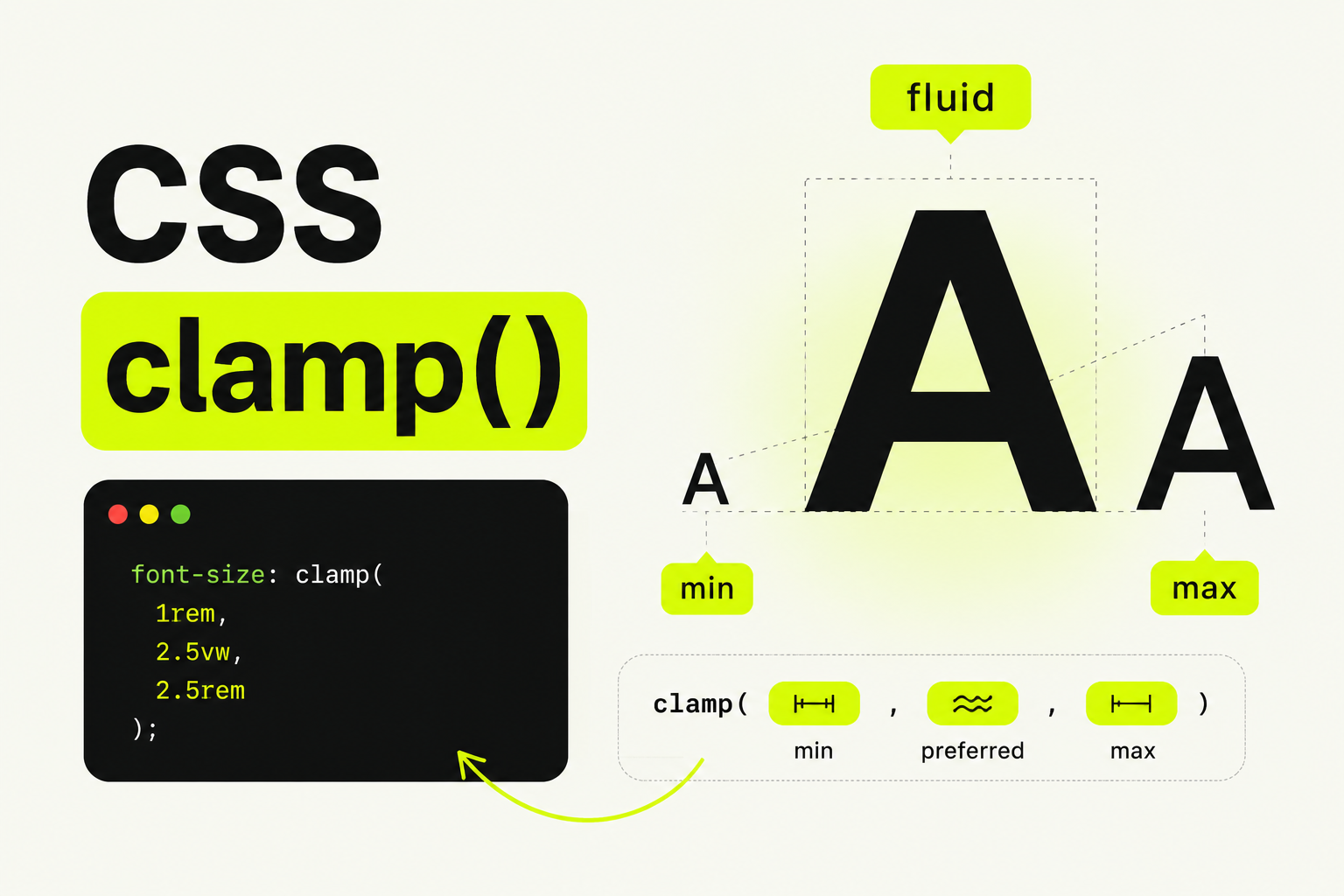
Bricks handles styling calculations with true code flexibility, allowing you to write complex responsive logic directly inside the visual input fields. This makes it incredibly easy to configure a responsive font size with CSS clamp, creating perfectly fluid typography systems that adapt dynamically to any viewport size without requiring rigid media query breaks.
As digital applications scale, editing large pages with hundreds of components can slow your browser to a crawl. The visual editing workspace of Bricks is built entirely on the modern Vue.js 3 framework.
The builder tree handles thousands of concurrent nodes without lag, rendering layout adjustments, structure movements, and responsive switches instantly.
The heavier JavaScript rendering engine running behind Breakdance can experience performance bottlenecks on highly complex page architectures.
Building standard content directories or multi-layered data platforms requires massive flexibility in how you pull information from the database. While both options feature robust loop engines, the Bricks vs Breakdance matchup favors Bricks when handling complex relational data.
Bricks allows developers to nest query loops deep within each other natively. You can query custom post fields, pull relations from Advanced Custom Fields (ACF) or Meta Box, and filter data arrays with absolute precision without writing custom PHP templates.
Accessibility is no longer an afterthought; it is a legal requirement for enterprise digital products. Bricks gives you complete authority over your HTML tags inside the structural tree view. With two clicks, you can convert a generic div into a semantic section, article, aside, or nav element.
Furthermore, Bricks allows you to manually append custom ARIA attributes to any component directly from the element panel, a level of execution that remains restricted within Breakdance’s abstracted UI.
Moving staging environments to production servers should be an unnoticeable process. However, due to how certain visual assets are registered in plugin environments, many developers experience annoying bugs like missing images after a migration on Breakdance.
Bricks functions fundamentally as a native WordPress theme rather than a system-altering plugin. This clean integration keeps your database structure standardized, making server migrations, automated backups, and database search-and-replace strings highly predictable.
The ecosystem surrounding Bricks is built by hardcore developers for hardcore developers. Extensions like Bricksforge and Bricksextras unlock advanced JavaScript interaction libraries, custom timelines, and global code execution setups.
This architectural stability makes it far easier to tie your front-end layouts into advanced infrastructure setups, ensuring your site can scale gracefully alongside automated systems without unexpected layout breakages.
If you choose to transition your workflow from Breakdance to Bricks, a gradual migration strategy is highly recommended. Never run both systems concurrently on the same URL string, as loading two competing layout assets will destroy your site performance.
Instead, map out your global structures in Bricks first. To maintain a flawless user experience for your active traffic while legacy templates transition over, consider deploying a custom CSS preloader to WordPress to smoothly mask asset loading sequences during your infrastructure upgrade.
Yes, from a pure structural code perspective, Bricks Builder renders fewer wrapper elements and generates a lighter DOM tree. This results in faster initial page loading times and superior mobile performance scores out of the box.
No direct automated migration tool exists because both platforms store layout data in entirely different formats. Pages must be rebuilt, which provides an excellent opportunity to clean up inline styles and implement a proper global class system.
While beginners can use it, Bricks has a steeper learning curve than Breakdance. It requires a fundamental understanding of CSS concepts, class architecture, and semantic HTML tag execution to unlock its full potential.
Ultimately, selecting the right platform comes down to your long-term goals. If your priority is quickly assembling standard websites using pre-packaged UI kits, Breakdance is incredibly efficient.
However, if your vision involves engineering scalable, enterprise-grade digital solutions with zero code bloat, clean global stylesheets, and uncompromised design precision, choosing Bricks is the ultimate upgrade for your development stack.